Article guide
Read, understand and apply the ideas to your project.
Top 10 Front End Languages: A Beginner's Guide
Welcome to the exciting world of front-end development! As the digital landscape continues to evolve, the demand for skilled front-end developers who can craft engaging and intuitive user experiences is at an all-time high. This guide is designed to help aspiring engineers and students navigate the fundamental languages and essential tools that form the backbone of modern web interfaces.
Understanding the core technologies is the first step towards building impressive web applications. Whether you dream of designing sleek user interfaces or developing interactive web experiences, mastering these front-end elements is crucial.
Key Concepts and Fundamentals of Front-End Development
Front-end development focuses on everything a user sees and interacts with in a web browser. It's about bringing designs to life and ensuring a seamless, responsive, and accessible user experience. The trinity of front-end development comprises:
- HTML (HyperText Markup Language): The fundamental building block of web pages, providing structure and content.
- CSS (Cascading Style Sheets): Responsible for the visual presentation and styling of web content, including colors, fonts, and layout.
- JavaScript: The engine of interactivity, allowing dynamic content, animations, and complex application logic to run directly in the browser.
Beyond these foundational languages, a modern front-end developer also leverages frameworks, libraries, and various tools to streamline development, manage code, and enhance application performance.
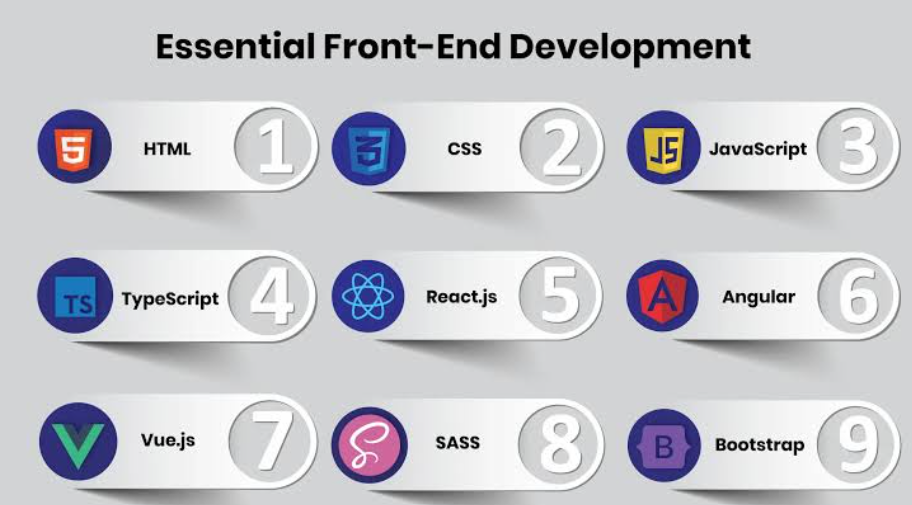
Top 10 Essential Front-End Languages & Tools for Beginners
Here’s a breakdown of the critical languages and tools you should prioritize as you embark on your front-end development journey:
1. HTML (HyperText Markup Language) - The Web's Skeleton
HTML is not a programming language but a markup language that structures content on the web. It's the absolute foundation of every webpage.
- Real-world Applications: Structuring text, images, videos, forms, and other elements on virtually every website.
- Tips for Beginners: Start by mastering semantic HTML tags (e.g.,
<header>,<nav>,<article>,<footer>) for better accessibility and SEO. Understand the DOM (Document Object Model).
2. CSS (Cascading Style Sheets) - The Web's Skin
CSS is used to style the look and feel of web pages written in HTML. It controls colors, fonts, layout, and responsiveness.
- Real-world Applications: Styling responsive layouts for mobile and desktop, creating animations and transitions, defining brand aesthetics.
- Tips for Beginners: Learn about the CSS Box Model, selectors, specificity, and Flexbox/CSS Grid for layout. Practice responsive design with media queries.
3. JavaScript - The Web's Brain
JavaScript is a versatile scripting language that enables interactive and dynamic content on websites. It's what makes web pages come alive.
- Real-world Applications: Interactive forms, dynamic content updates, single-page applications (SPAs), browser games, and API communication.
- Tips for Beginners: Master core concepts like variables, data types, functions, loops, conditionals, and DOM manipulation before diving into frameworks. Understand asynchronous JavaScript (Promises, async/await).
4. TypeScript - JavaScript with Superpowers
TypeScript is a superset of JavaScript that adds optional static typing. It compiles down to plain JavaScript and is designed for large-scale applications.
- Real-world Applications: Building robust, maintainable enterprise-level web applications, enhancing developer productivity, and catching errors early.
- Tips for Beginners: Learn fundamental type annotations, interfaces, and classes. It's best learned after you have a solid grasp of JavaScript.
5. Sass/Less - Advanced CSS Preprocessing
Sass (Syntactically Awesome Style Sheets) and Less are CSS preprocessors that extend CSS with features like variables, nesting, mixins, and functions, making styling more efficient and maintainable.
- Real-world Applications: Managing complex stylesheets in large projects, theme development, and component-based styling.
- Tips for Beginners: Choose one (Sass is generally more popular) and learn its syntax, variables, nesting, and mixins. It will significantly improve your CSS workflow.
6. React - The UI Powerhouse (JavaScript Library)
Developed by Facebook, React is a declarative, component-based JavaScript library for building user interfaces, especially single-page applications.
- Real-world Applications: Instagram, Facebook, Airbnb, Netflix. Ideal for dynamic UIs where data changes frequently.
- Tips for Beginners: Understand JSX, components, props, state, and the React Hook API. Start with functional components.
7. Angular - The Comprehensive Framework (JavaScript Framework)
Maintained by Google, Angular is a robust, opinionated framework for building complex enterprise-grade web applications. It offers a structured approach to development.
- Real-world Applications: Google products, Forbes, Upwork. Suited for large-scale applications with a strong ecosystem.
- Tips for Beginners: Learn about components, modules, services, data binding, and the CLI. Familiarity with TypeScript is highly beneficial.
8. Vue.js - The Progressive Framework (JavaScript Framework)
Vue.js is an approachable, versatile, and performant JavaScript framework known for its simplicity and progressive adoption. It's easier to pick up than Angular.
- Real-world Applications: GitLab, Nintendo, Alibaba. Excellent for both small projects and scalable applications.
- Tips for Beginners: Focus on components, reactivity, directives, and the Vue CLI. Its gentle learning curve makes it a great choice for quick prototyping.
9. Git - The Version Control Essential
While not a programming language, Git is an indispensable version control system that tracks changes in code during software development. It's crucial for collaboration.
- Real-world Applications: Collaborative coding, tracking project history, managing different versions of a project.
- Tips for Beginners: Learn basic commands like
git clone,git add,git commit,git push,git pull, and branching. Practice with platforms like GitHub or GitLab.
10. npm/Yarn - Package Management
npm (Node Package Manager) and Yarn are package managers for JavaScript, used to install, manage, and share dependencies for your projects. They are fundamental for modern front-end workflows.
- Real-world Applications: Installing front-end libraries (like React), development tools, and managing project dependencies.
- Tips for Beginners: Understand
package.json, and common commands likenpm install,npm run,npm update, or their Yarn equivalents.
Common Mistakes to Avoid for Beginners
- Skipping Fundamentals: Don't rush into frameworks without a solid understanding of vanilla HTML, CSS, and JavaScript.
- Ignoring Responsive Design: Always build with mobile-first principles in mind. Most users access the web on mobile devices.
- Poor Version Control Habits: Commit frequently with meaningful messages. Understand branching and merging.
- Not Practicing Enough: Theory is important, but hands-on coding is where real learning happens. Build small projects constantly.
- Overcomplicating Solutions: Start simple. Choose the right tool for the job, not just the trendiest one.
- Neglecting Browser Compatibility: Test your applications across different browsers to ensure consistent user experience.
Conclusion and Call to Action
Embarking on a front-end development journey is a rewarding experience. By focusing on these core languages and essential tools, you'll build a strong foundation for a successful career in web development. Remember, the tech landscape is constantly evolving, so continuous learning is key.
Ready to put your knowledge into practice? Explore more projects on Projects Hub to find inspiration, collaborate with peers, or start building your very first front-end project today! The best way to learn is by doing.